Sometimes when you configure Storefront 2.0 and you create a store to access your apps for your current XenApp 6.5 Farm .You may not see any of your published applications.
And the page looks like:

Just a message:
"There are no apps or desktops assigned to you at this time"
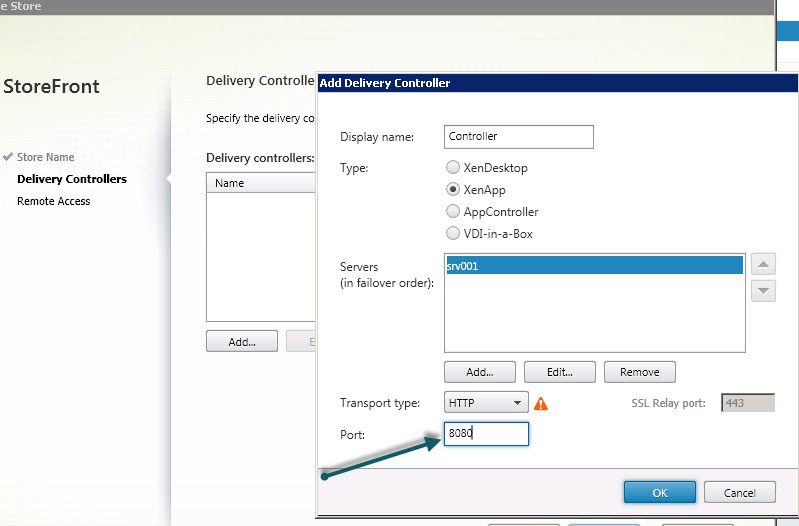
You need to make sure that while Creating the store you need to specify the correct port for XML broker for your farm.
Like in our case it is 8080

Also in case if you want to show the Apps by default on the Logon page you can use the following keywords while publishing the applications in the AppCenter
These keywords are : Auto Featured TreatAsApp
Auto -- Will show the published application by default
Featured --To add to the featured list
There are others you can add as well

Then it will show as:

Hope this helps.
And the page looks like:

Just a message:
"There are no apps or desktops assigned to you at this time"
You need to make sure that while Creating the store you need to specify the correct port for XML broker for your farm.
Like in our case it is 8080
Also in case if you want to show the Apps by default on the Logon page you can use the following keywords while publishing the applications in the AppCenter
These keywords are : Auto Featured TreatAsApp
Auto -- Will show the published application by default
Featured --To add to the featured list
There are others you can add as well

Then it will show as:

Hope this helps.
This was VERY HELPFUL indeed.!
ReplyDeleteThanks!
Hi, I'm Rajasekar.
ReplyDeleteI also faced the same issue on xendesktop 7.1 and fixed the issue by enabling check box on access policy setting says "Allow connections not through Netscaler" on Delivery Group Properties. Everyone will agree that this is a small setting i forgot to choose and i was checking on XML port related troubleshooting.
Hope it helps to others who made mistake like me. :)
Solutions tested . Its Work .Thanks For shearing this kind updated info.
ReplyDeleteWindows Thin Client & Zero Clients
This is a great blog, usually i don't post comments on blogs but I would like to say that this post really forced me to do so!
ReplyDeleteIT Equipment Distributor & Wholesale servers
Thanks !!! Solved my problem
ReplyDeleteThanks that worked for me as well!!
ReplyDelete