
Updating Dell R720


Updating Dell R720

I had to update a new Dell R720 server , being the first time it took a lot of time to find the details on how to do things;

I downloaded the Latest SUU DVD  from:

http://www.dell.com/support/drivers/us/en/555/DriverDetails/Product/poweredge-r720?driverId=T1XHC&osCode=WS8R2&fileId=3105458864&languageCode=en#


Connect to the iDRAC

The default username and Password fro dell iDRAC :

Username : root
Password: calvin

Click on launch  in the Virtual Console Preview

Power on the machine

As the Machine boots Up we have to Press F10 During POST

The steps are shown in the images as follows:


You have to choose Platform Update


First we can view the current updates


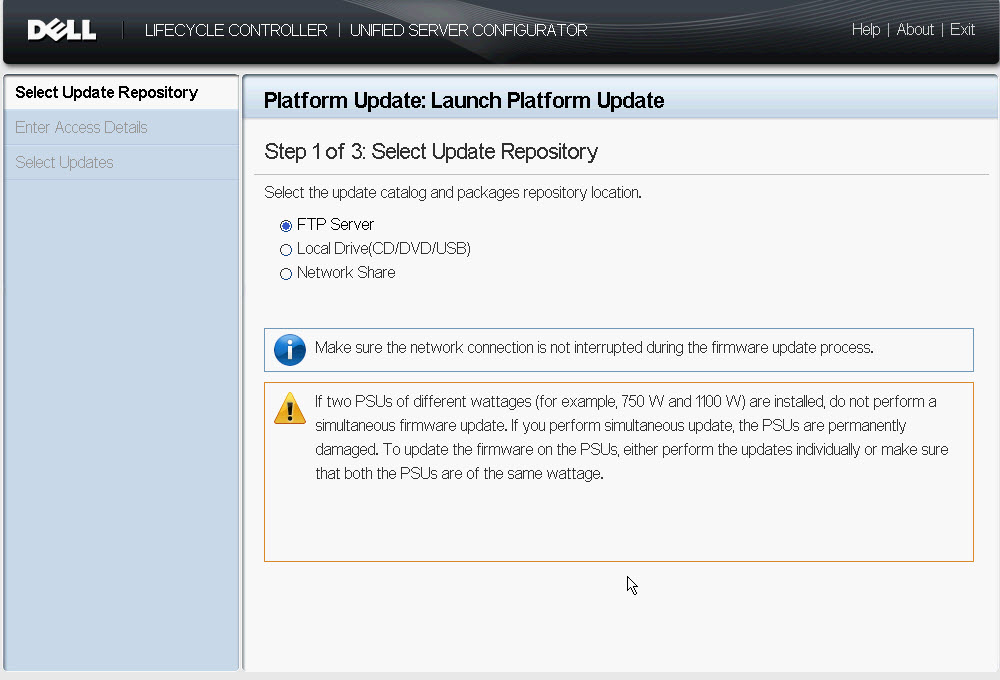
Now we can choose to  Launch platform Update


We can choose to dell  ftp Site for latest updates , or use the Local CD/DVD/USB or Network


 You have to configure Networking first


I will choose DHCP , just to make it simple for me as we have a DHCP server on the network;


If you choose to use FTP , you have to include the proxy settings for your environment


In case you want to use CIFS/NFS Share instead of FTP


If you want to use Local CD/DVC/USB

You can locally Attach the ISO you downloaded as iDRAC Virtual Media 


We attached the ISO image that we downloaded form http://www.dell.com/support/drivers/us/en/555/DriverDetails/Product/poweredge-r720?driverId=T1XHC&osCode=WS8R2&fileId=3105458864&languageCode=en


It may reboot in order to update other components

Hope this Helps

Comments

Popular posts from this blog

Group Policy Object did not apply because it failed with error code '0x80070534 No mapping between account names and security IDs was done

One of our servers was losing the Local Admin settings as we control them using GPO (restricted Groups) We were receiving the following event on this particular server : Event ID 4098 Application Event Log The computer 'Administrators (built-in)' preference item in the 'Servers Local Admins {odjd9DBD-22AF-48EA-ADF5-F42ADE4182hst}' Group Policy Object did not apply because it failed with error code '0x80070534 No mapping between account names and security IDs was done.' This error was suppressed. To fix the issue we deleted all the folders from the following location and rebooted the server C:\ProgramData\Microsoft\Group Policy\History Hope this helps.

DSS WSUS server fail to download Updates HTTP status 404: The requested URL does not exist on the server.

When managing a Downstream WSUS server , it may happen that when a patch is approved it tried to immediately download it form the source server (USS) Sometime we see errors in event viewer stating that the the download failed Event ID: 364 Content file download failed. Reason: HTTP status 404: The requested URL does not exist on the server. Source File: /Content/6E/72131F469F73C884B32124746BAFCA2C8E0A106E.cab Destination File: E:\WSUS\WsusContent\6E\72131F469F73C884B32124746BAFCA2C8E0A106E.cab Event ID 10032 The server is failing to download some updates. We also see following entries in softwaredistribution.log 2016-09-26 07:53:29.287 UTC Warning WsusService.3 ContentSyncAgent.ProcessBITSNotificationQueue ContentSyncAgent recieved Failure for Item: f52f0b8a-2b22-43cf-933e-af8de6b11eb6, Item fails 2016-09-26 07:53:29.287 UTC Info WsusService.3 ContentSyncAgent.ContentSyncSPFireStateMachineEvent ContentSyncAgent firing Event: FileDownloadFailed for Item: f5...

iDRAC 7 Shows no Signal in Virtual Console Preview

Recently i logged on to iDRAC for one of our Dell R720 servers,however somehow the console redirection did not work at all. I kept on seeing No Signal on the Virtual console Preview. I tried Rebooting the server but that did not help. Finally i clicked on Reset iDRAC and this did the trick. It may take around 2 -5 minutes before you can access iDRAC page again. I had to power on the server through iDRAC before anything showed up on console. Hope this Helps.